

Best for private data, client portals, or development versions of your website.
- +971 56 844 2059
- info@waincewebtech.com
- Vision Tower, Business Bay, Dubai, UAE
If you’ve ever searched for something on Google and found irrelevant, outdated, or unwanted websites showing up again and again, you’re not alone. Whether you’re trying to clean up your personal search experience, protect sensitive content from appearing on Google, or manage SEO visibility for your brand, learning how to exclude a website from Google Search can be extremely useful.
This guide explains every possible way to remove a website or a specific page from Google Search results, both as a user and as a website owner.
Before you learn the step, let yourself understand the reasons why you want to remove your site and below we have written a short but complete break down of common reasons:
So whether you’re a search user or a site owner, you can take control in different ways. Let’s break it down.
If you’re simply tired of seeing certain websites in your search results, there are a few methods to hide or filter them out.
The easiest and fastest way to erase a website while searching on Google is by using the “–site:” search operator.
Example:
If you want to search for “digital marketing tips” but remove results from example.com, type:

Result: Google will show you all relevant results except anything from that particular website.
This trick works instantly and is perfect for everyday searches.
Google’s Advanced Search option allows you to customize search results.
Here’s how you can do it:
This gives you clean and focused search results without manual filtering every time.
If you often want to automatically remove certain websites, browser extensions can help.
Tools like uBlacklist (for Chrome or Firefox) allow you to block unwanted sites from appearing in your Google search results permanently.
You can manually add URLs you want to hide, and Google results will instantly skip those websites every time you search.
Best for: People who research regularly and want a cleaner search experience.
If you own a website or manage content, sometimes you might not want Google to index specific pages or sections.
It could be:
Here are all the professional ways to eliminate your website or pages from Google Search safely.
The most common and SEO-safe way to omit a webpage from Google is by using the “noindex” meta tag.
Add this line to the <head> section of your page’s HTML code:

The robots.txt file is a text file in your website’s root directory that instructs search engine crawlers about which pages to crawl or ignore.
Here’s an example:
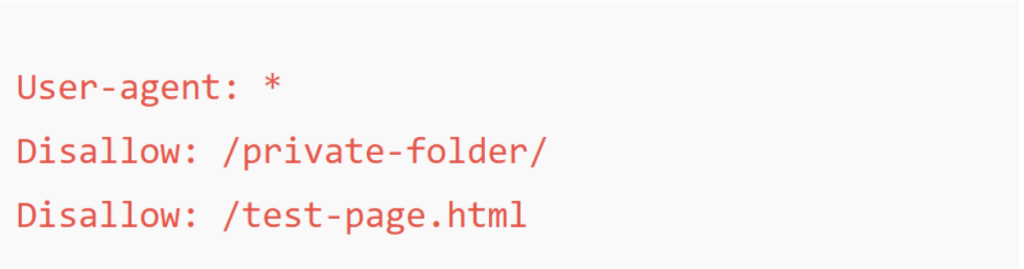
What it does: It prevents search engines from crawling the listed URLs.
This webmaster tool (GSC) provides you a complete control on how your website will appear in search results. If you want to temporarily remove a page or directory from Google’s index, follow these steps:
What it does: It hides the page for about 6 months. During that time, you can also add a noindex tag or permanently delete the page if needed.
If you want to completely block Google from accessing certain pages (like staging sites or private dashboards), use password protection.
You can use this method by using a WordPress plugin or through a web hosting panel (cPanel).
Google can’t index pages that require login credentials.
Best for private data, client portals, or development versions of your website.
If your content has already been indexed and you no longer want it visible, you can:
This combination ensures both users and crawlers stop accessing the deleted content.
Sometimes, you may want Google to index your main website but delete only a few pages — such as old blog posts, thank-you pages, or test content.
You can easily do that by:
Example:

This tells Google that another page is the main version, so the duplicate won’t appear in search.
Excluding a website (yours or someone else’s) has specific effects depending on the method you use:
Many website owners make small but serious mistakes when trying to eliminate pages. Here are a few to watch out for:
Excluding pages should always be part of a strategic SEO approach. Here are some pro tips:
This balance helps you maintain a clean, optimized website structure, without losing visibility for important pages.
Information about excluding websites gives you power, whether you’re cleaning your personal search experience or optimizing your site’s SEO performance.
For users, simple tricks like the “-site:” operator or browser filters can make searches more relevant.
For website owners, professional tools like robots.txt, noindex tags, and Google Search Console provide complete control over what appears (and what doesn’t) in Google results.
By using these methods wisely, you can protect sensitive content, refine SEO focus, and maintain a clean online presence, exactly how you want Google to see it.


Waince Web Tech is a Digital Creative Freelancing Platform . We create joyful digital experiences and unique visual.

Waince Web Tech is a Digital Creative Freelancing Platform . We create joyful digital experiences and unique visual.